



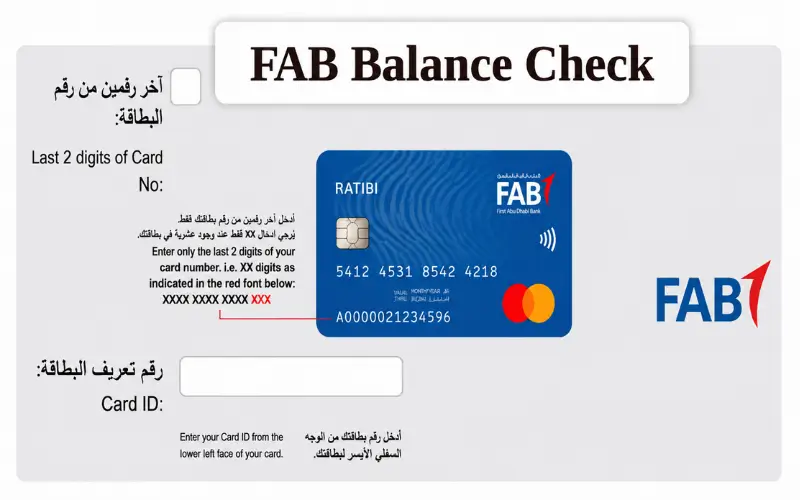
To view the balance of your FAB account, simply log into your account and check the balance. First Abu Dhabi Bank (FAB) provides multiple official methods of checking the balance. Make use of the FAB Mobile app, Online banking, ATM, Phone banking, or the Ratibi balance enquiry service. All of the methods are secure and meet different customer needs. This guide demonstrates how to do all the allowed FAB balance check simply. It also addresses Ratibi salary cards, prevalent balance concerns, and vital security suggestions to secure your account.
Quick Facts About FAB Balance Check
| Feature | Details |
| Bank | First Abu Dhabi Bank (FAB) |
| Country | United Arab Emirates (UAE) |
| Supported Accounts | Current, Savings, Salary & Eligible Prepaid Cards |
| Official Balance Check Methods | FAB Mobile, Online Banking, ATM, Phone Banking, Ratibi Enquiry |
| Internet Required | Yes (Digital Banking), No (ATM & Phone Banking) |
| Authentication | Password, OTP, and Biometric Login (supported devices) |
| Availability | 24/7, except scheduled maintenance |
What Is a FAB Balance Check?
A “balance check” is the process of accessing the amount of funds in your First Abu Dhabi Bank account or eligible prepaid payroll card through one of the official banking channels of the bank.
The balance enquiry might show:
- Available balance
- Current account balance
- Recent transaction history
- Salary credits
- Card activity
- Queued transactions (via the supported digital channels)
Depending on whether you are running a current account or a savings account, or using a prepaid payroll card like the Ratibi Card, there is varying information available. For each of the products, FAB provides various ways of enquiry to reach the right banking platform for the customer.
Who Can Use FAB Balance Check Services?
FAB offers balance enquiry service to a wide variety of personal banking customers.
These include:
- Current Account holders
- Savings Account holders
- Salary Account customers
- People who use Ratibi Payroll Card.Users of Ratibi Payroll Card.
- Eligible prepaid cardholders
- To prevent these costs from being incurred, customers have to register for FAB Digital Banking.
All of these customers are able to check their balances, but the methods vary based on the product. Traditional account holders can access FAB Mobile and Online Banking, while Ratibi cardholders can access the dedicated prepaid enquiry system that is offered for payroll cards.
Official Methods to Perform an FAB Balance Check
Several secure enquiry about balance options are available with FAB, and customers can select the one they prefer, according to their banking habits.
Check Your Balance Using FAB Mobile
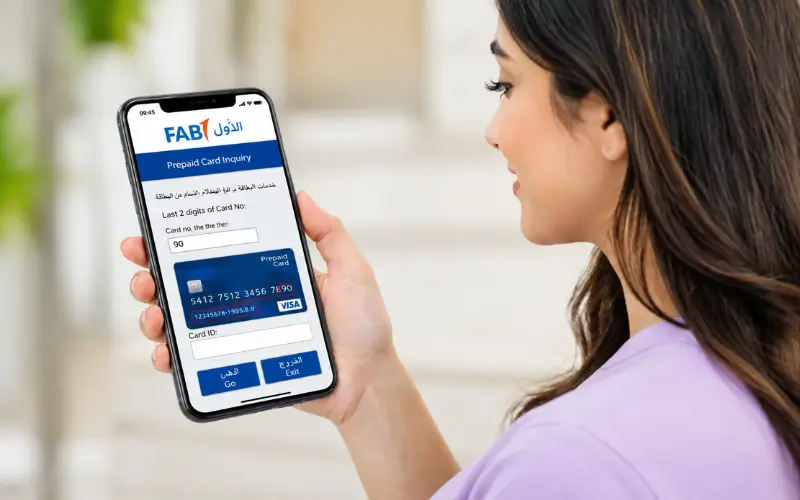
FAB Mobile is the fastest and most convenient way for most of the customers.
In the official banking application, customers can securely:
- View account balances
- Check recent transactions
- Manage debit & credit cards.
- Transfer money
- Pay bills
- Benefit from banking services at any time, anywhere.
Once you are signed in, your available balance is displayed on your dashboard so you can easily check your finances without having to go to a branch. The application can be used in English and Arabic, and is compatible on Android and Apple devices.
How to Check Your Balance
- Download the official FAB Mobile app.
- Log in with your registered details.
- Complete biometric / OTP verification as required.
- View your balance on the account dashboard.
It is the best app for customers who make frequent checks on salary deposits, transfers, or spending because of the near real-time application updates.
Check Your Balance Through FAB Online Banking
For those who would like to use a desktop or laptop, they can log in to their accounts via FAB Online Banking.
Once successfully logged on securely, customers may:
- View current and available balances
- Review recent transactions
- Download account statements
- Manage beneficiaries
- Transfer funds
- Use other types of digital banking services
Online Banking is especially convenient for those who own several accounts or need to keep track of all their accounts. As with the mobile app, access to the site is secured with secure authentication processes.
Check Your Balance at a FAB ATM
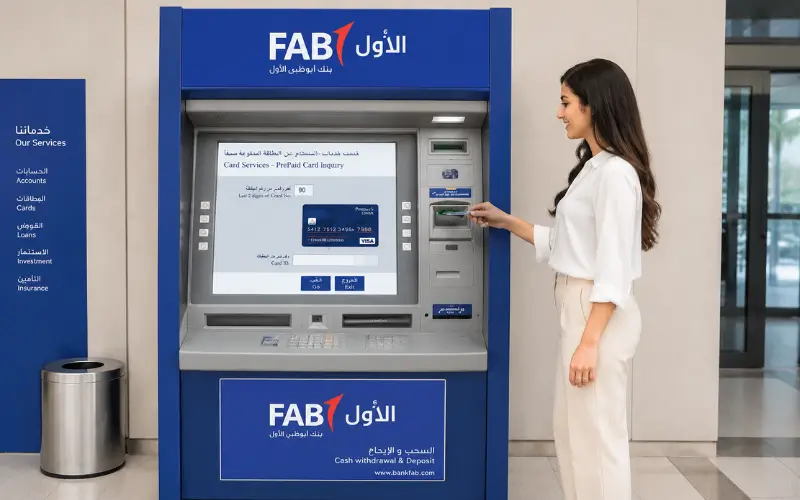
Customers can check their balance using a FAB ATM if they do not have access to the Internet.
It is a simple process:
- Slide in your debit card or eligible prepaid card.
- Enter your PIN.
- Select Balance Inquiry.
- Check your available balance, or print a receipt.
ATM enquiries are particularly helpful in case customers are traveling or are without internet during brief downtimes, as they will be able to access their account information offline.
Check Your Balance Using Phone Banking
FAB also offers Phone Banking to customers who require support not via digital banking.
Once a customer has been verified, they can ask for:
- Available balance information
- Recent account activity
- Card-related assistance
- General banking support
Personal banking and Ratibi’s official contact numbers are available on the FAB’s website, allowing customers to get help from official sources.
Visit an FAB Branch
Those who would like to access services via a face-to-face interaction can come to the FAB branches for balance enquiries and account support.
Contact representatives from the branch for help with:
- Account balance enquiries
- Statement requests
- Digital banking registration
- Debit card issues
- General account services
Digital channels can be more convenient for regular enquiries, but they’re less effective when further account checks or tailored support are needed, where a branch visit is a more valuable option.
FAB Balance Check for Ratibi Payroll Card Users
A lot of users think that a Ratibi Payroll Card is the same as a bank account. In fact, Ratibi is a prepaid payroll service provided by FAB that can be used by qualified employees to receive salaries electronically, without needing to have a bank account. This means that Ratibi customers will have a different enquiry about their balance than a current/savings account holder.
Customers of Ratibi can check their available balance using the official prepaid enquiry service provided in connection with the Ratibi programme or via supported ATMs. Since the product is not a standard FAB account, signing on using the Online Banking process won’t give access to Ratibi card balances.
Difference Between an FAB Bank Account and a Ratibi Payroll Card
One of the biggest reasons customers face problems during an FAB balance check is using the wrong balance enquiry method for their banking product. Although both First Abu Dhabi Bank (FAB) accounts and Ratibi Payroll Cards allow users to receive salary payments, they are designed for different purposes and offer different banking services.
A current or savings account is a full-service banking relationship with FAB. Customers can access FAB Mobile, Internet Banking, transfer funds, download statements, manage debit and credit cards, and use a wide range of digital banking services.
A Ratibi Payroll Card, however, is a prepaid salary solution that allows employers to pay eligible employees electronically without requiring them to open a traditional bank account. Because it is a prepaid product, balance enquiries are handled differently from standard FAB accounts. FAB directs Ratibi users to the official prepaid enquiry service rather than standard online banking.
| Feature | FAB Current/Savings Account | Ratibi Payroll Card |
| Traditional Bank Account | Yes | No |
| FAB Mobile | Yes | Limited |
| FAB Internet Banking | Yes | No |
| Salary Credits | Yes | Yes |
| ATM Withdrawals | Yes | Yes |
| Download Statements | Yes | Limited |
| Fund Transfers | Yes | Limited by programme |
| Balance Enquiry | App, Internet Banking, ATM, Phone Banking | Official prepaid enquiry portal and ATM |
Understanding this distinction saves time and prevents failed login attempts when trying to access account information.
How to Register for FAB Digital Banking
In case you have recently opened an FAB account, you need to register for digital banking prior to using the FAB mobile application or Internet banking.
Registration aims at securing and verifying the identities of customer accounts.
Registration Steps
- Download the official FAB Mobile application or open FAB Internet Banking.
- Click Register if you’re a new digital banking customer.
- Use your account or Debit card information to verify identity.
- Fill in the OTP received at your registered mobile number.
- Choose a username and password.
- Please log in to view your account dashboard.
After logging into their account, customers can view balances, monitor transactions, transfer funds, pay utility bills, download e-statements, request cheque books, print IBAN letters and manage their accounts all in one place.
Available Balance vs Current Balance: Understanding the Difference
When customers try to look at their account and think it doesn’t match what they’ve recorded, it’s actually a comparison of two banking figures.
| Balance Type | What It Means |
| Available Balance | The amount currently available to spend, transfer, or withdraw. |
| Current Balance | The total balance recorded in the account before all pending transactions are fully settled. |
For instance, when you use your debit card for a purchase, the merchant could set up an authorisation hold first. During this time, the amount will be reflected in the available balance, but may appear as part of the current balance until settlement.
Other situations that may temporarily affect your balance include:
- Payments of salary still to be made.
- Unsettled refunds for cards.
- International transfer verification in progress.
- Hotel or car rental security deposits.
- Pending card authorisations.
These banking jargon terms will help customers not have to worry about any credit delays or loss of funds.
How to Confirm Your Salary Has Been Credited
The most popular trigger for an FAB balance check may be to verify whether your monthly salary has been deposited.
If you have your salary deposited to a regular FAB account, you can check it by means of:
- FAB Mobile
- FAB Internet Banking
- FAB ATM
- Phone Banking
If you get your salary on a Ratibi Payroll Card, only access the card through the official prepaid enquiry service or by checking the card balance at an ATM that is compatible with the card’s security chip.
Several factors affect the availability of salaries:
- The employer’s payroll submission schedule.
- Processing time for internal banks.
- Public Holidays & weekends in the UAE.
- Payment verification procedures.
If the payroll is confirmed as processed by your employer and you have not received the funds after a reasonable amount of time, FAB advises you to call Customer Care via the official channels.
Common Reasons Your FAB Balance May Not Update Immediately
A transaction does not always result in a change of account balance. Banking systems operate with various types of transactions, all of which are settled on the basis of the rules and networks used for payments.
Pending Card Transactions
Many people may get their card approved, but pay for it later. Your available balance might be reduced, and the transaction will be pending during this time.
Bank Transfer Processing
The settlement period for transfers within FAB accounts is typically fast, and transfers to other countries could involve extra compliance measures and/or intermediary bank settlement.
Salary Processing Delays
Payroll salary credits aren’t visible until the successful banking process is completed after the employer releases payroll.
Scheduled Maintenance
FAB carries out regular maintenance on the Mobile App and Internet Banking services. These maintenance periods may result in the interruption of digital services, or some account information may not refresh until after the maintenance. The official FAB Service Status page is where customers can keep updated on the availability of banking services in real-time.
Security Tips for Safe FAB Balance Enquiries
Often, banking customers are lured by phishing emails, fake banking log-in pages, and fraudulent SMS messages. Security of your banking information is as critical as checking your balance.
To remain secure, your account:
- Only the official FAB Mobile App and FAB Internet Banking are to be used.
- Do not divulge your password, PIN, or OTP to anybody.
- Never enter your logon details on links in unsolicited email messages or SMS.
- If available, use biometric authentication.
- Ensure that the mobile banking app is kept up to date.
- Check your recent transactions frequently and alert to any suspicious activity right away.
Additionally, FAB urges its customers to remember that its staff will not call, email, or send texts asking for confidential information like passwords or one-time passwords.
Can You Perform an FAB Balance Check Without Internet?
Yes. While digital banking is the quickest, being online isn’t a requirement.
Customers can also view their balance through:
- Using a FAB ATM.
- Calling the FAB Phone Banking.
- Walking into FAB branches.
Offline means that when customers don’t have access to a network, they still have access to the account information that is important to them.
FAB Balance Check Troubleshooting
The majority of balance enquiry problems are short-term and can be solved without a branch visit. Knowing what may be causing the issue may save you time, and you might be able to find the right solution.
| Issue | Possible Cause | Recommended Solution |
| Unable to log in | Incorrect username or password | Reset your credentials using the official FAB recovery process. |
| OTP not received | Mobile network delay or unregistered number | Verify your registered mobile number and request a new OTP. |
| Balance not updated | Pending transactions or salary processing | Wait until the transaction is settled or contact FAB if the delay is unusual. |
| Mobile app not working | Scheduled maintenance or outdated app | Update the app or check the official FAB Service Status page. |
| ATM cannot read your card | Damaged, expired, or blocked card | Try another FAB ATM or contact Customer Care. |
If the problem still occurs after following the recommended solution, please reach out to First Abu Dhabi Bank Customer Care via the official channels provided on the bank’s website.
Best Method for Different Types of Customers
All the methods can be used to verify your account balance, but some may be better for you depending on your banking needs.
| Customer Type | Recommended Method | Why It Is Best |
| Personal Banking Customer | FAB Mobile | Fast access to balances, transactions, transfers, and card management. |
| Business Traveller | FAB Internet Banking | Convenient access from any secure desktop browser. |
| Customer Without Internet | FAB ATM | Balance enquiry without requiring an internet connection. |
| Ratibi Payroll Card Holder | Official Ratibi Balance Enquiry | Specifically designed for prepaid payroll cards. |
| Customer Requiring Assistance | Phone Banking or FAB Branch | Suitable for account-specific queries or technical support. |
The right channel helps to minimize problems with signing in and get you into your account faster.
Common Mistakes to Avoid During an FAB Balance Check
Most balance enquiry issues are because customers unwittingly use the wrong process or fail to follow simple security procedures.
Try not to make any of these common errors:
- Trying to log in to FAB Internet Banking with a Ratibi Payroll Card instead of using the official prepaid enquiry service.
- Entering your password on websites that look like the FAB login page.
- Providing your One-Time Password (OTP) to anyone who calls or emails from the bank.
- Failure to follow the maintenance notifications on the schedule as they are for the system. Not adhering to the maintenance notifications on the schedule as they are for the system.
- Storing passwords on shared or public computers.
- Using obsolete versions of the FAB Mobile app.
By observing official banking procedures, you ensure the protection of your account and are able to get correct balance details.
Why Official FAB Channels Are the Safest Option
If you do a quick search on the internet for FAB balance check, you will find numerous third-party websites promising balance enquiry services and/or step-by-step instructions. Your banking details must, however, only be input on the official FAB platform.
Official channels provide:
- Encrypted login sessions.
- Multi-factor authentication.
- Secure password recovery.
- Fraud monitoring and security measures.
- The ability to receive the most up-to-date account details.
Customers who use unofficial websites to log on to their banks’ websites could put themselves at risk for phishing and ID theft. Please ensure that you are on the official First Abu Dhabi Bank website or the official FAB Mobile application before signing in.
Conclusion
A FAB balance check is a safe and fast process when conducted via the official channels of First Abu Dhabi Bank. Check your balance using FAB Mobile, Internet Banking, ATM, Phone Banking, or Ratibi Balance Enquiry service for your type of account. Ensure you use the way you are supposed to, or you will be unable to log on to your account or get the correct balance information on your payroll card. Remember to stay on the official FAB platform, not to reveal your login information, and to check your account regularly to manage your finances with confidence.
Frequently Asked Questions
What is the fastest way to perform a FAB balance check?
For those who qualify, the FAB Mobile app is usually the fastest choice. After signing in securely, your available balance, recent transactions, and other banking services are displayed on the home dashboard.
Can I check my FAB balance without using the mobile app?
Yes. Use FAB Internet Banking, an FAB ATM, Phone Banking, or head to one of FAB’s branches. Any Ratibi Payroll Card users should use the official prepaid balance enquiry service or supported ATMs.
Is an internet connection required to check my FAB balance?
No. The mobile app and Internet Banking need an internet connection to be used, while customers can verify their balance via FAB ATMs, Phone Banking, or at any branch.
Why is my available balance lower than my current balance?
This typically occurs due to upcoming transactions waiting to be processed, an unsettled transaction, or a temporary hold by the merchant. After the transactions are completely fulfilled, both balances are adjusted.
How can Ratibi Payroll Card users check their balance?
Please note that if you are a Ratibi cardholder, you should use the official Ratibi prepaid balance enquiry service provided by FAB or check the balance at an ATM supported by Ratibi. The card cannot be accessed from the FAB Internet Banking.
Is there a fee for checking my FAB account balance?
Generally, users of FAB will not be charged for checking their balance using FAB’s official digital banking channels. Some third-party and/or international ATMs may charge fees, though. Please see the current Schedule of fees available from FAB for up-to-date details.
What should I do if I cannot access my FAB account?
If you are unable to log in, use one of the official password recovery options or contact FAB Customer Care. Never disclose your password, PIN, or OTP to anyone, including those who say they are from the bank.
Disclaimer
The information on this website is provided for general informational purposes only. While we strive to keep our content accurate and up to date, we cannot guarantee its completeness or accuracy. Information is compiled from publicly available and official sources where applicable. We are not affiliated with or endorsed by any government authority, bank, or financial institution. Please verify important information with the relevant official source before making any financial or business decisions.